WHAT'S NEW ON TECH EP. 2

Hi there! Hello ici!

I have not been writing for a long time because... well, I did not have much to say to be honest. I would rather give you qualitative content to read than quantitative with poor quality behind. So now, I have a lot of things to share with you and several articles are coming up!

First, I finished the HTML course on Codecademy!
Second, I created a website for my friends on Jimdo so I can give you a full review of the service. I just need to get the final feedback and change a few things and I can show it to you afterwards.
Third, what am I going to do next with HTML language?

But for now, let's see what's new on tech!

Je n'ai pas écrit sur le blog depuis quelques temps... pour être honnête, il s'agissait tout simplement du fait que je n'avais pas grand chose à partager. Je préfère vous donner du contenu qualitatif à lire que des articles qui s'enchaînent avec une piètre qualité. Mais maintenant j'ai pas mal de choses à partager et ce dans plusieurs articles à venir!

Premièrement, j'ai fini le cours d'HTML de Codecademy!
Deuxièmement, j'ai créé un site internet pour des amies sur Jimdo et je serai donc à même de vous donner mon avis sur les services proposés. Je dois juste attendre le feedback final et effectuer les derniers petits changements pour pouvoir vous le montrer.
Troisièmement, qu'est-ce que je vais faire avec le code HTML maintenant?

Mais à présent voyons ce qu'il y a de nouveau dans la technologie!

1. THE ROBOT THAT SEWS AN ENTIRE PIECE OF CLOTHING / LE ROBOT QUI COUD UNE PIECE DE VÊTEMENT EN ENTIER

Yes you read it right...

Jonathan Zornow - a genius! - created a robot and a program that allow a machine to sew an entire piece of clothing.
To make it simple, as for now, machines can cut the fabric, sew pieces but not an entire one. You still need to have employees to pass on, rotate, return the piece in order to get the sewing right.
One big issue was the fabric itself, indeed, it is way too soft to be handled by an automated arm.
Zornow came up with a solution and found out that if you put the fabric into a liquid version of the polymer it would be stiff and so pickable by the arm to be moved around! Right after the piece is finished, just put it in the water to make it go back to its normal shape.

What do you think about this project? Do you foresee opportunities using that robot?

Original article: MIT Technology Review


Oui vous avez bien lu...

Jonathan Zornow - un génie! - a créé un robot ainsi qu'un programme qui permettent à une machine de coudre un vêtement en entier.
Pour faire simple, jusqu'à maintenant, les machines peuvent couper le tissu, coudre des pièces ensemble mais pas un vêtement entier. Vous avez toujours besoin de personnes qui font passer les pièces, les tournent, retournent pour que les coutures soient bien faites.
Le problème majeur qui se posait était le tissu lui-même, en effet, il est bien trop mou pour être manipulé par un bras automatique.
Zornow a donc cherché et trouvé une solution. Si vous mettez le tissu dans une version liquide du polymère, le tissu devient rigide et le bras peut dont le prendre et le manipuler comme bon lui semble! Juste après avoir terminé la pièce, mettez-là dans un bain d'eau pour qu'elle retourne à son état originel.

Que pensez-vous du projet? Voyez-vous des opportunités d'utilisation de ce robot?

Article source: MIT Technology Review

2. HOW CODE CAN PROTECT YOUR JOB - COMMENT LE CODE PEUT-IL PROTEGER VOTRE EMPLOI

This is a good one! How coding can actually prevent myself from losing my job? I can already hear the sceptical saying this is pure fantasy smoke.

If you look at new educational programs, coding is making its way through all stages of children education. 
A lot of free or low-cost (I do not really like this term as it always induces 'poor' quality in everyone's mind but it is not always the case) programs exist in a lot of countries in order to attract people interested in that matter.
The demand in programing is much higher than the number of people who can deal with it. 

A good example is given by Londoner Kathryn Parsons - Decoded co-founder. The US employ about three million people in the truck industry and we have all heard about the automated driving systems and how technology is influencing this industry. 

Can you see the simple equation: three million persons knowing code/programming at different levels? The added value would be consequent! 

Original article: The Evening Standard

code digital program blog coding technology innovation codecademy MIT Londres New York USA Etats-Unis Angleterre London France Paris tech entrepreneur female femme créer entreprise apprendre blog autodidacte own technology sillicon valley myself autodidact programmeur programator HTML CSS style font family size decoded
Kathryn Parsons - Decoded co-founder and co-CEO
En voici une nouvelle intéressante! Comment le code peut-il vous aider à garder votre emploi? Je vois déjà les sceptiques dirent qu'il ne s'agit que de poudre de perlimpinpin.

Si vous jetez un coup d'oeil aux nouveaux programmes éducatifs, le code fait une entrée fracassante à tous les niveaux d'éducation.
Beaucoup de programmes gratuits ou peu chers (attention, cela ne veut pas dire que la qualité est moindre) existent dans une multitude de pays et ont pour but d'attirer les personnes intéressées par ce sujet.
La demande en programmeur est bien supérieure au nombre de personnes qui savent utiliser les langages de code.

Un très bon exemple est donné par la londonienne Kathryn Parsons - co-fondatrice de Decoded. Les Etats-Unis emploient à peu près trois millions de personnes dans l'industrie du transport routier et nous avons tous entendu parler des systèmes de conduite automatique et comment la technologie influence ce secteur.

Pouvez-vous voir la simple équation: trois millions de personnes qui connaitraient le code/la programmation à différents niveaux? La valeur ajoutée serait plus que conséquente!

Article source: The Evening Standard

To be continued in the next episode, Amélie X
La suite au prochain épisode, Amélie X

CSS or C'EST SUPER STYLE!

Hello Monday readers! Bonjours lecteurs du Lundi!

Here comes CSS (Cascading Style Sheets) intro! I could not believe myself how wonderful this part of HTML is! It makes your life so much easier once you control it. Let's see what it is all about.

Et voilà le CSS (ou le C'est Super Stylé!) avec une petite introduction! Je n'en croyais pas mes yeux de découvrir à quel point cet outil de l'HTML est si génial! Cela vous rend la vie tellement plus facile une fois que vous le maitrisez. Voyons voir ce que nous pouvons dire à ce sujet.

1. CSS & HTML

You need to separate HTML and CSS as CSS is the shape and HTML is the functional structure. 
There are two reasons for that:
- CSS allows to apply the same style to several different HTML pieces without re-writing all over again the same codes for each element
- You can apply an identical style to several different HTML pages from one unique file

The most efficient way to write a CSS file is to do it on a separate page and to link the two files after:
a- Write your HTML code with the content
b- Write your CSS code to indicate the style you want to have
c- Link the CSS page on your HTML page
d- Tadah! Everything looks perfect as you wanted to!

Il faut séparer le HTML et le CSS car le CSS est la forme et le HTML est la structure fonctionnelle.
Il y a deux raisons pour cela:
- Permet d'appliquer le même style à plusieurs éléments HTML sans devoir écrire le code pour chacun des éléments
- On peut appliquer une apparence et un formatage identique à plusieurs pages HTML à partir d'un seul et unique fichier

La manière la plus efficace d'écrire un document CSS est de le faire sur une page séparée du document HTML:
a- Ecrivez votre code HTML avec le contenu
b- Ecrivez le code CSS pour indiquer le style que vous désirez avoir
c- Créer un lien vers le CSS dans la page HTML
d- Tadah! Tout a une apparence parfaite comme vous le souhaitiez!

2. How to link your CSS into your HTML doc / Comment lier votre CSS dans votre doc HTML

Link has three attributes listed below:
a- 'type' always has to equal 'text/css'
b- one attribute 'rel' which always needs to equal 'stylesheet'
c- another attribute 'href' that needs to point to the internet address where your CSS doc is stored

<link type='text/css'; rel='stylesheet'; href='stylesheet.css'>

Le lien (link) a trois attributs listés ci-dessous:
a- 'type' doit toujours être égal à 'text/css'
b- un attribut 'rel' doit toujours être égal à 'stylesheet'
c- un attribut 'href' qui doit pointer vers l'adresse internet de votre fichier CSS

3. CSS syntaxe / La syntaxe CSS

The base format is as below:
Le format est indiqué ci-dessous:

code digital program blog coding technology innovation codecademy MIT Londres New York USA Etats-Unis Angleterre London France Paris tech entrepreneur female femme créer entreprise apprendre blog autodidacte own technology sillicon valley myself autodidact programmeur programator HTML CSS style font family size
Credits: codecademy.com
As shown above, there are three criteria:
- selector: any HTML elements (<p>; <img>; <table> ...). You just need to get rid of the tags
- property: one of the selector's characteristics. The font family, the font size, the colour... All characteristics that can be attributed to one word or to paragraphs in your web pages
- value: one of the possible value of the property. For example 'red' is a possible value of the property 'color'.

Comme montré ci-dessus il y a trois critères:
- selector (sélecteur): n'importe quel élément de l'HTML (<p>; <img>; <table> ...). Il suffit juste de retirer les balises
- property (propriété): une caractéristique d'un sélecteur. La famille de police, sa taille, la couleur... N'importe quelle caractéristique qui peut être attribuée à un mot ou des paragraphes dans vos pages web
- value (valeur): il s'agit de l'une des valeurs possibles de la propriété. Par exemple, 'red' est l'une des valeurs possibles pour la propriété 'color'

>> All property-value couples need to be ended with ';' or it won't work <<
>> Chaque couple de propriété-valeur doit se terminer par ';' ou cela ne fonctionnera pas <<

I have put an example below of what the HTML and CSS doc both look like. The result in the right window. Do not hesitate to let me know if you have question :)

J'ai mis un exemple ci-dessous de ce à quoi ressemblent les docs HTML et CSS. Le résultat est dans la fenêtre de droite. N'hésitez pas à me faire connaître vos questions!

code digital program blog coding technology innovation codecademy MIT Londres New York USA Etats-Unis Angleterre London France Paris tech entrepreneur female femme créer entreprise apprendre blog autodidacte own technology sillicon valley myself autodidact programmeur programator HTML CSS style font family size
Credits: codecademy.com
code digital program blog coding technology innovation codecademy MIT Londres New York USA Etats-Unis Angleterre London France Paris tech entrepreneur female femme créer entreprise apprendre blog autodidacte own technology sillicon valley myself autodidact programmeur programator HTML CSS style font family size
Credits: codecademy.com
NB: I just started a 'real' first project with Jimdo. Do you foresee what I am talking about? ;)
NB: j'ai d'ailleurs commencé un premier 'vrai' projet avec Jimdo. Est-ce que vous voyez ce dont je veux parler? ;)

To be continued in the next episode, Amélie X
La suite au prochain épisode, Amélie X

TWO FUNNY CODE STORIES FOR YOUR WEEKEND!

Hello Hello Hello!

Let's bring some fun to the weekend! Apportons un peu de fun à votre week-end!

1. Pixar and Coding - Pixar et le Code

Yes! It is all about animation movies - I have a thing with the Minions even though they are not from Pixar but Illumination. Whether you like them or not, you must admit that those films are pure artistic creations. They bring you to some worlds your imagination could not even have created (and your brain remains the best partner you have when it comes to creation). I won't explain it more, just click HERE to watch it!

code digital program blog coding technology innovation codecademy MIT Londres New York USA Etats-Unis Angleterre London France Paris tech entrepreneur female femme créer entreprise apprendre blog autodidacte on my own technology sillicon valley myself autodidact programmeur programator HTML Pixar Nemo animation maths Danielle Feinberg magic magique ingrédient ingredient movies films film movie
Credits: ted.com

Oui! Il s'agit bien là de films d'animation - J'ai vraiment un truc avec les Minions même si ils ne sont pas la propriété de Pixar mais d'Illumination. Que vous les aimiez ou pas, vous devez admettre que ces films sont de la pure création artistique. Ils vous emmènent dans des mondes que même votre imagination n'aurait pu créer (et votre cerveau reste le meilleur partenaire que vous ayez lorsqu'il s'agit de création). Je n'en expliquerai pas plus, cliquez ICI pour regarder la vidéo!

2. Tab or Space when you code? - Quand vous codez, êtes-vous plus Tabulation ou Espace?

That's a good one! When you code, do you use Tab or Space? It is the same 'issue' as on Word. Would you type five times over the space bar to make a bigger space or use one time the tab key? The noise of typing several times on the space bar can be very annoying ;)
Wonder what all the programmers in the world use? Check it out below.
Felipe Hoffa, Developer Advocate at Google, studied about 1 billion files on GitHub = 400,000 projects = 14 Tb of data (not that much right?). He removed all duplicated and small files. Once done, he split all the files by category and here you are: the results are on the picture below.
So, are you more Tab or Space?

code digital program blog coding technology innovation codecademy MIT Londres New York USA Etats-Unis Angleterre London France Paris tech entrepreneur female femme créer entreprise apprendre blog autodidacte on my own technology sillicon valley myself autodidact programmeur programator HTML tab tabulation space
When you use tab equals a long straight line. Credits: feub.net
code digital program blog coding technology innovation codecademy MIT Londres New York USA Etats-Unis Angleterre London France Paris tech entrepreneur female femme créer entreprise apprendre blog autodidacte on my own technology sillicon valley myself autodidact programmeur programator HTML tab tabulation space
When you use spaces equals dots. Credits: feub.net
En voici une bien bonne! Quand vous codez, vous utilisez plutôt la Tabulation ou l'Espace? C'est le même 'problème' que sur Word. Est-ce que vous tapez cinq fois sur la barre d'espace pour faire l'espace plus grand ou juste une seule fois sur la touche tab? Entendre le bruit de la barre d'espace plusieurs fois d'affilée peut vite devenir frustrant ;)
Vous vous demandez ce que les programmateurs du monde entier utilisent? Regardez ci-dessous.
Felipe Hoffa, un Développeur de Google, a étudié 1 milliard de fichiers sur GitHub - 400,000 projets = 14 Tb de données (tellement peu n'est-ce pas?). Il a supprimé tous les fichiers dupliqués ou trop petits. Une fois cette étape effectuée, il a séparé les fichiers en catégories et vous y êtes: les résultats sont sur la photo ci-dessous. 
Alors, plutôt Tab ou Espace?

code digital program blog coding technology innovation codecademy MIT Londres New York USA Etats-Unis Angleterre London France Paris tech entrepreneur female femme créer entreprise apprendre blog autodidacte on my own technology sillicon valley myself autodidact programmeur programator HTML Java Python tab tabs tabulation tabulations space spaces keyboard
Credits: medium.com / Felipe Hoffa
Bonus: click here to see how you can lose a potential love affair if you are a space user and your target believes in tab!

Bonus: cliquez ici pour voir comment vous pouvez perdre une potentielle histoire d'amour si vous êtes fan de la barre d'espace et que votre cible est plutôt en mode tab!


Hope you liked it! J'espère que vous avez aimé!

To be continued in the next episode, Amélie X
La suite au prochain épisode, Amélie X

SHAPING THE PAGE II

Hello Friday readers! Bonjour lecteurs du vendredi!

It is now time to see what else we can do to shape and style your page. Today is all about the <style> attribute. We have seven elements to review plus a little bonus or maybe two...

Il est maintenant l'heure de voir ce que nous pouvons faire de plus pour styliser votre page. Aujourd'hui est entièrement consacré à ce que l'on appelle l'attribut <style>. Nous avons sept éléments à étudier ainsi qu'un petit bonus ou peut-être deux...

1. What is the style attribute? Qu'est-ce que l'attribut style?

The 'style' attribute is the key word you need to write between other tags in order to activate it and style the page: <p style="blablabla">

L'attribut 'style' est le mot clef que vous devez écrire à l'intérieur d'autres balises pour pouvoir l'activer et styliser la page: <p style="blablabla">


2. Font size - Taille de police

Very simple combination: <p style="font-size:12px">

p: paragraph
style: indicates an attribute change
font-size: font size change
12: size of the font
px: unit of the size, the pixel

Combinaison assez simple: <p style="font-size:12px">

p: paragraphe
style: indique un changement d'attribut
font-size: changement de la taille de police
12: taille de la police
px: unité de la taille de police, le pixel

3. Colour - La couleur

You can also change the colour. To do so, just replace 'size' by 'color' (US written): <title><h2 style="font-color:red"></title>
You cannot invent the color you want but a list exists so you can refer to it: click here to access

Vous pouvez aussi changer la couleur. Pour se faire, vous n'avez qu'à remplacer 'size' par 'color' (écriture en anglais US): <title><h2 style="font-color:red"></title>
Vous ne pouvez pas inventer la couleur que vous souhaitez mais devez vous référer à une liste qui existe: cliquez ici pour y avoir accès

4. Font family - Type de police

Fancy an original font type? What you need is 'font-family' and the name of the font you want to use: <p style="font-family:arial">

Vous avez envie d'une police originale? Vous aurez besoin de 'font-family' et du nom de la police que vous voudrez utiliser: <p style="font-family:arial">

5. Background - Le fonds 

You can change the background as well if you think white is too boring: <style="background-color:green"> 
The same list of font colours apply to background.

Vous pouvez aussi changer le fonds si vous trouvez que le blanc est vraiment trop ennuyeux: <style="background-color:green">
La liste de couleurs disponibles est la même que pour les polices d'écriture.


6. Text alignment - Justification de texte

You can align your text as you would do in any of the Office pack programs: left, right, centre. Here is the combination: <style="text-align:center">

Vous pouvez aussi aligner votre texte comme dans les programmes du Pack Office: gauche, droite, centre. Voici la combinaison: <style="text-align:center">

7. Your font in bold or italic - Votre police en gras ou italique

Now that we used different attributes to style the font, we can highlight words by putting them in bold and/or italic.
- Bold: <strong></strong>
- Italic: <emphasize></emphasize>

Maintenant que nous avons utilisé différents attributs pour styliser la police, nous pouvons aussi mettre en évidence certains mots en les mettant en gras et/ou italique.
- Gras: <strong></strong>
- Italique: <emphasize></emphasize>

8. What about multiple attributes at the same time? - Et si l'on veut mettre plusieurs attributs en même temps?

Now that you know what style you want to give your page you can write it in one simple tag. 
Let's say I want to write in courier - 22 pixels - black - yellow background and one word in bold: <style="font-family:courier;font-size:22px;font-color:black;background-color:yellow>

The only thing you need to do is add a semi colon between each attribute.

Maintenant que vous savez quel style vous souhaitez donner à votre page, vous pouvez l'écrire en un seul tag très simple. 
Disons que nous souhaitons écrire en courier - 22 pixels - noir - fonds jaune et un mot en gras: <style="font-family:courier;font-size:22px;font-color:black;background-color:yellow>

La seule chose à faire est d'ajouter des points-virgules entre chaque attribut.

code digital program blog coding technology innovation codecademy MIT Londres New York USA Etats-Unis Angleterre London France Paris tech entrepreneur female femme créer entreprise apprendre blog autodidacte on my own technology sillicon valley myself autodidact programmeur programator HTML
Credits: codecademy.com

Bonus 1

Nothing explains better a product, system than a video right? So let's see how we can add one! Difficult one to do (but not too much) ;)
You need to use all the different attributes below to add the video onto your page:
- width/height: sets the size of the screen that displays the video
- controls: adds play, pause, volume
- source src: sets the URL of the video to play
- type: specifies the video format

<video width="320" height="240" controls><source src="video-url.mp4" type="video/mp4"></video>

Rien de mieux qu'une vidéo pour expliquer votre produit, système n'est-ce pas? Regardons maintenant comment pouvons-nous en ajouter une! Difficile à faire (mais pas trop quand même) :)
Vous devez utiliser les différents attributs ci-dessous pour ajouter la vidéo à votre page:
width/height: la largeur et la hauteur de la vidéo
controls: ajoute les boutons play, pause, volume
source src: indique l'URL source de la vidéo
type: indique le format de la vidéo

<video width="320" height="240" controls><source src="video-url.mp4" type="video/mp4"></video>

Bonus 2 #FAIL

Here I come with my first big fail in blogging/HTML!

You may have spotted very weird styles in my articles (you cannot anymore as I changed everything now). Different fonts, sizes, styles... Nothing consistent at all. For those who know me, I am sure you can already picture me very annoyed by this! I like to have the same shape in all the articles (who would not?). 

After I spoke with my friend Beth (who knows how to code and way better than me) and explained her the situation with at least 20 texts (big SMS lover here) and a lot of angry emojis, she told me I made a huge mistake: writing my articles on Word and copy/paste them onto blogger to publish them.
Word does not use a raw text format. What is raw text? It is text in the most simple version, no style and attributes at all. When you copy/paste the text from Word, you will also copy some hidden attributes that will pretty much messes everything up in your HTML code if you are a beginner like me.

End of the story? Not that much. I had to spend 2.5 hours (luckily the Bee Gees were kind to me and played some good music in the background) copying, pasting the articles onto TextEdit-Mac (WordPad-Windows) and put 'Default' in the Style tab so everything went back to normal. Then, pasted the articles back to Blogger and restyled them again.

I hope this made you laugh because I did not! 
I am just happy I could solve the problems myself! 
I am a big believer that you can make mistakes as long as you quickly learn from them and find a solution to solve the problem  ;) 


Me voilà avec mon premier bel échec en blog/HTML!

Vous avez certainement du voir des styles très bizarres dans mes articles (enfin vous ne pouvez plus maintenant car j'ai déjà tout changé). Des polices, tailles et styles différents... Rien de consistant. Pour ceux qui me connaissent, je suis sûre que vous me voyez déjà très ennuyée par ce problème! J'aime avoir le même style dans tous mes articles (qui ne voudrait pas d'ailleurs?).

Après avoir discuté avec mon amie Beth (qui sait coder et beaucoup mieux que moi) et lui avoir expliqué la situation avec au moins 20 messages (je voue une passion à l'envoi multiple de SMS) et pas mal d'emojis pas très contents, elle m'a indiqué que j'avais fait une erreur assez grossière: écrire mes articles sur Word et les copier/coller sur Blogger pour ensuite les publier.
Word n'utilise pas de texte brut. Qu'est-ce que tu le texte brut me direz-vous? Ce sont des mots dans leur version la plus simpliste avec aucun style et sans aucun attribut. Lorsque vous copiez/collez le texte de Word, vous copierez aussi des attributs cachés qui mettront le bazar partout dans votre code HTML si vous êtes un débutant comme moi.

Fin de l'histoire? Pas vraiment. J'ai passé 2.5 heures (heureusement que les Bee Gees étaient là à jouer de la bonne musique dans le fonds) à copier, coller les articles sur TextEdit-Mac (WordPad-Windows) et mettre 'Défault' dans l'onglet Style afin que tout redevienne normal. Et ensuite, j'ai recollé les articles dans Blogger et les ai restylisés.

J'espère que cette petite histoire vous aura fait rire car moi pas!
Je suis juste contente d'avoir pu résoudre le problème moi-même! 
Je suis plutôt partie prenante de faire des erreurs du moment qu'on apprend rapidement d'elles et que l'on trouve des solutions au problème ;)

Here you are for today! Come back next week for new discoveries on trends and how to code in HTML. Have a lovely weekend!

Et voilà pour aujourd'hui! Revenez la semaine prochaine pour de nouvelles découvertes sur les tendances et comment coder en HTML. Passez un excellent week-end!

To be continued in the next episode, Amélie X
La suite au prochain épisode, Amélie X

SHAPING THE PAGE I

Hello everyone,

Long time no speak right? Well, I am back now!

If you remember last time, I introduced you to how to shape the page with <head>, <title>, <body> and <p>. You can obviously do more than this simple distinction between each section and add a little twist to it!
Today, I wanted to show you four elements that will help you shape and style your page: title size, text link, image link, lists.

Bonjour tout le monde, 

Cela faisait longtemps que l'on ne s'était pas vu n'est-ce pas? Et bien je suis de retour maintenant!

Si vous vous souvenez de la dernière fois, je vous avais introduits sur la mise en page avec <head>, <title>, <body> et <p>. Vous pouvez bien sûr faire plus que cette simple distinction entre chaque section et y ajouter un peu plus de cachet!
Aujourd'hui, je voulais vous montrer quatre éléments qui vous aideront à donner forme et style à votre page: taille du titre, lien de texte, lien d'image, listes.

Title Size - Taille du Titre

You can give your title six different sizes: 1 is the biggest and 6 the smallest.
To do so, you need to insert the size it in your title’s tags as shown below:

<title><h1>Hello</title>
<title><h6>Hello</title>

Vous pouvez donner six tailles différentes à votre titre: 1 étant la plus grande et 6 la plus petite.
Pour faire ceci, vous devez ajouter la taille que vous désirez à l'intérieur des crochets du titre. Je vous montre ci-dessous comment procéder:

<title><h1>Hello</title>
<title><h6>Hello</title>

code digital program blog coding technology innovation codecademy MIT Londres HTML New York USA Etats-Unis Angleterre London France Paris tech entrepreneur female femme créer entreprise apprendre blog autodidacte on my own technology sillicon valley myself autodidact programmeur programator codecademy title size
Credits: codecademy.com

Text Link - Lien de Texte

What about creating links in your page?
When you surf on a website you always click on something that redirects you to something else on another page. This is called a link. Again, if you are a good user of the Office pack, you must know the little trick ctrl+k or cmd+k. When highlighting a word/piece of text you can nest an URL in it in order to avoid the ugly look of a long URL link in an email for example.

It is a bit complicated as you need to use two tags that are nested into each other:

<a></a> are the link tags that will enable you to redirect the clicker to somewhere else. It is the piece of text that will appear on the screen and contain the link. It is when clicking on that text that you will be redirected to the web page that has been given as a target/destination to href
<href> is the destination's URL where you want to send that person to

Sounds like a bit complicated? Follow the steps below to better understand the concept:

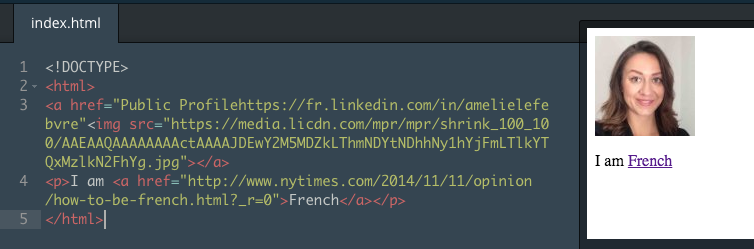
Text: I am French
URL: http://www.nytimes.com/2014/11/11/opinion/how-to-be-french.html?_r=0
HTML: I am <a href=”http://www.nytimes.com/2014/11/11/opinion/how-to-be-french.html?_r=0">French</a>

- Code is on line 4 -


> Do not forget to add the equal sign at the beginning and the inverted commas at the beginning and at the end of the URL

Et si l'on créait des liens sur votre page?

Quand vous naviguez sur un site internet vous cliquez toujours sur quelque chose qui vous redirigera vers un autre endroit sur une autre page. Cela s'appelle un lien. Encore une fois, si vous êtes un bon utilisateur du pack Office vous devez être familier avec l'astuce du raccourci de lien ctrl+k ou cmd+k. En effet, quand vous surlignez un mot ou un morceau de texte vous pouvez y intégrer un lien URL pour éviter l'horrible vision d'un long lien URL dans un email par exemple.

C'est un peu compliqué car vous devez utilisez deux systèmes de balises qui sont imbriquées l'une dans l'autre:


<a></a> sont les balises de lien qui vous permettront de rediriger la personne qui clique vers un autre endroit. C'est le texte qui apparaitra sur votre écran et qui contiendra le lien. C'est lorsque vous cliquer sur ce texte que vous serez redirigé sur la page internet qui a été donnée comme cible/destination à href
<href> l'URL de destination où vous désirez renvoyer la personne

Cela semble un peu biscornu? Suivez les étapes ci-dessous pour mieux comprendre le concept:

Texte: I am French

URL: http://www.nytimes.com/2014/11/11/opinion/how-to-be-french.html?_r=0
HTML: I am <a href=”http://www.nytimes.com/2014/11/11/opinion/how-to-be-french.html?_r=0">French</a>

- Le code est sur la ligne 4 - 

> N'oubliez pas de mettre le signe égal au début et les guillemets au début et à la fin de l'URL


code digital program blog coding technology innovation codecademy MIT Londres New York USA Etats-Unis Angleterre London France Paris tech entrepreneur female femme créer entreprise apprendre blog autodidacte on my own technology sillicon valley myself autodidact programmeur programator HTML
Credits: codecademy.com

Image Link - Lien d'Image

You can also create a link through a picture.
A typical case of execution is when you are shopping online. I see something I fancy (those New Balance shoes spotted on Asos) and decide to click on the picture to know more about it. It redirects me to the product description.
Let’s see how we do this one. Beware! It adds a little bit of difficulty to the previous combination.
Vous pouvez aussi créer un lien sur une image.

Un cas typique d'exécution est lorsque vous achetez en ligne. Je vois quelque chose qui me plait (ces New Balance que j'ai repérées sur Asos) et décide de cliquer sur l'image pour en savoir un peu plus. Cela me redirige sur la description produit.
Regardons comment faire pour le lien d'image. Attention! Cette combinaison est un peu plus difficile que la précédente.


code digital program blog coding technology innovation codecademy MIT Londres New York USA Etats-Unis Angleterre London France Paris tech entrepreneur female femme créer entreprise apprendre blog autodidacte on my own technology sillicon valley myself autodidact programmeur programator HTML asos New Balance shoes shoe fashion mode basket tennis chaussures chaussure
Credits: asos.com
code digital program blog coding technology innovation codecademy MIT Londres New York USA Etats-Unis Angleterre London France Paris tech entrepreneur female femme créer entreprise apprendre blog autodidacte on my own technology sillicon valley myself autodidact programmeur programator HTML asos New Balance shoes shoe fashion mode basket tennis chaussures chaussure
You need the elements below:

<img> is the image tag as for <a>, a text tag
<src> source is equivalent to <href> which will indicate where to find the picture

Image: my picture on my LinkedIn profile
Image's URL: https://media.licdn.com/mpr/mpr/shrink_100_100/AAEAAQAAAAAAAActAAAAJDEwY2M5MDZkLThmNDYtNDhhNy1hYjFmLTlkYTQxMzlkN2FhYg.jpg

Destination: my LinkedIn profile

LinkedIn profile URLPublic Profilehttps://fr.linkedin.com/in/amelielefebvre

<a href=“link to where I want the person to land on”<img src=”image’s URL”></a>
<a href=“Public Profilehttps://fr.linkedin.com/in/amelielefebvre”<img src=”https://media.licdn.com/mpr/mpr/shrink_100_100/AAEAAQAAAAAAAActAAAAJDEwY2M5MDZkLThmNDYtNDhhNy1hYjFmLTlkYTQxMzlkN2FhYg.jpg”></a>

Vous avez besoin des informations suivantes:

<img> la balise de l'image comme la balise <a> pour le texte
<src> correspond à source qui équivaut à la balise <href> qui indiquera où trouver l'image

Image: la photo de mon profil LinkedIn
URL de l'image: 
https://media.licdn.com/mpr/mpr/shrink_100_100/AAEAAQAAAAAAAActAAAAJDEwY2M5
MDZkLThmNDYtNDhhNy1hYjFmLTlkYTQxMzlkN2FhYg.jpg

Destination: mon profil LinkedIn
URL de mon profil LinkedIn: Public Profilehttps://fr.linkedin.com/in/amelielefebvre

<a href=“link to where I want the person to land on”<img src=”image’s URL”></a>
<a href=“Public Profilehttps://fr.linkedin.com/in/amelielefebvre”<img src=”https://media.licdn.com/mpr/mpr/shrink_100_100/AAEAAQAAAAAAAActAAAAJDEwY2M5MDZkLThmNDYtNDhhNy1hYjFmLTlkYTQxMzlkN2FhYg.jpg”></a>


code digital program blog coding technology innovation codecademy MIT Londres New York USA Etats-Unis Angleterre London France Paris tech entrepreneur female femme créer entreprise apprendre blog autodidacte on my own technology sillicon valley myself autodidact programmeur programator HTML
Credits: codecademy.com

Lists - Listes

You find your page a bit messy and would like to create lists in order to make it clearer. What would you use for that? Bullet points of course!
A bit easier than the two previous ones, the tags are shown below:

Vous trouvez votre page un peu en désordre et voulez créer des listes pour que cela soit plus clair. 
Première option: Je veux que ma liste soit organisée et chiffrée


Que pouvez-vous utiliser pour y arriver? Des puces bien sûr!
Plus facile que les deux combinaisons précédentes, les balises sont ci-dessous:

First option: I want my list to be organized and have numbers in front of each line
<ol></ol> stands for Organized List
<li></li> tags that enable to mark out each point of the list

Let’s create a list of the steps I follow to write my posts:
<ol>
<li>Write what I want to share in English</li>
<li>Find the pictures I want to share</li>
<li>Translate in French</li>
<li>Read again to spot mistakes</li>
<li>Publish the post</li>
</ol>

Première option: Je veux que ma liste soit organisée et chiffrée
<ol></ol> correspond à Organized List (Liste Organisée)
<li></li> balises qui permettront de repérer chaque ligne de la liste

Créons une liste qui permet de suivre les étapes d'écriture de mes articles:
<ol>
<li>Ecrire ce que je veux partager en anglais</li>
<li>Trouver les images que je veux partager</li>
<li>Traduire en français</li>
<li>Relire pour repérer des erreurs</li>
<li>Publier l'article</li>
</ol>

code digital program blog coding technology innovation codecademy MIT Londres New York USA Etats-Unis Angleterre London France Paris tech entrepreneur female femme créer entreprise apprendre blog autodidacte on my own technology sillicon valley myself autodidact programmeur programator HTML
Credits: codecademy.com
code digital program blog coding technology innovation codecademy MIT Londres New York USA Etats-Unis Angleterre London France Paris tech entrepreneur female femme créer entreprise apprendre blog autodidacte on my own technology sillicon valley myself autodidact programmeur programator HTML
Credits: codecademy.com
Second option: I just want to draw a random list with bullet points
<ul></ul> stand for Unorganized List
<li></li> tags that enable to mark out each point of the list

What you need to learn how to code:
<ul>
<li>A computer or a laptop</li>
<li>A notepad and a pen</li>
<li>Motivation</li>
<li>Patience</li>
</ul>

Deuxième option: Je veux juste créer une liste avec des puces
<ul></ul> correspond à Unorganized List (Liste Non Organisée)
<li></li> balises qui permettront de repérer chaque ligne de la liste

Ce dont vous avez besoin pour apprendre à coder:
<ul>
<li>Un ordinateur</li>
<li>Un cahier et un stylo</li>
<li>De la motivation</li>
<li>De la patience</li>
</ul>

code digital program blog coding technology innovation codecademy MIT Londres New York USA Etats-Unis Angleterre London France Paris tech entrepreneur female femme créer entreprise apprendre blog autodidacte on my own technology sillicon valley myself autodidact programmeur programator HTML
Credits: codecademy.com
code digital program blog coding technology innovation codecademy MIT Londres New York USA Etats-Unis Angleterre London France Paris tech entrepreneur female femme créer entreprise apprendre blog autodidacte on my own technology sillicon valley myself autodidact programmeur programator HTML
Credits: codecademy.com
To be continued in the next episode, Amélie X
La suite au prochain épisode, Amélie X